Documentation

The user guide of the assistant that reads and operates your AWS, Azure, Google Cloud, OVHcloud, Scalingo and Scaleway accounts in plain language.

Summary

Introduction

This documentation is for the users of CloudOps Move2Cloud, the multi-cloud assistant developed by Move2Cloud. You connect your cloud accounts, then ask in plain language: the assistant reads your Amazon Web Services (AWS), Microsoft Azure, Google Cloud, OVHcloud, Scalingo and Scaleway accounts to answer, and prepares the changes you ask for as a plan that runs only once you confirm it.

It is made for the people who run cloud infrastructure, alone or as a team: each organisation shares its cloud accounts, gives every member a role, and works on one subscription.

CloudOps Move2Cloud comes from the research and development of Move2Cloud, begun in 2024. This research earned Move2Cloud the Jeune Entreprise Innovante (JEI) status, confirmed by the French State for 2024 and 2025. The JEI status · The CloudOps Move2Cloud project

Key Features

One Conversation per Cloud Account

Ask about AWS, Azure, Google Cloud, OVHcloud, Scalingo and Scaleway accounts in plain language. Each conversation is bound to one account; you can attach images and text files to a question.

Delegated Secure Access

Connect cloud accounts using scoped permissions without sharing master credentials, maintaining security best practices.

Changes as Plans

Create, modify or delete resources by asking. The assistant shows the exact steps first, runs them only once you confirm, then reads the result back to tell you what really happened.

Teams, Roles and Plans

Invite colleagues into your organisation as read-only, operator or administrator. Cloud accounts and the monthly token allowance of your subscription are shared by the whole team.

Library of Questions

The questions your team asks again and again, kept for everyone by the administrators, and each member's own; the assistant suggests some from what an account really holds. One click asks a question, three can be pinned to the menu.

Approvals and Journal

An administrator can require their approval before an operator's change runs, or only before a deletion. Every change run is kept in the journal, with who confirmed it and what happened, summarised and exported as CSV or PDF.

Cloud providers and the access they need

Move2Cloud reads and acts on each cloud account only through an access you create and keep the control of: the rights are yours to choose, and removing the access cuts it at once.

Amazon Web Services (AWS)

Let the assistant read your AWS account, and apply the changes you confirm, through a role created in that account.

A role created by a CloudFormation stack: no access key is created or kept. Temporary STS credentials remain available for a test.
  • The stack creates one role, M2cChatbotRole. Only the Move2Cloud platform can use it, and only for your own account here (external id).
  • You decide the rights: the role gets the IAM policies you list, for example ReadOnlyAccess to look only, PowerUserAccess to act on every service without managing IAM, or narrower ones such as AmazonEC2FullAccess or a policy of your own. Every change still needs your confirmation in the conversation.
  • To change the rights, update the stack with other policies. To remove the access, delete the stack.
Microsoft Azure

Let the assistant read your Azure subscriptions, and apply the changes you confirm, with the roles you choose.

The CloudOps Move2Cloud application: you authorise it in your directory and give it roles. No application or secret to create. Your own application remains possible.
  • The application only gets the roles you deploy, on the subscriptions you choose. Removing a role assignment, or deleting the application from your enterprise applications, cuts the access at once.
  • A domain profile (virtual machines, network...) does not include reading the rest of the subscription: keep Read-only ticked with it.
  • Azure takes from a few seconds to several minutes to take a role into account. If no subscription is found when you save, use Check the connection in the account's menu a little later.
  • A subscription created with a personal Microsoft account (outlook.com, live.com...): Microsoft refuses that account on the organisations' sign-in. In the wizard, click the link for personal accounts and give your directory's ID (Azure portal, Microsoft Entra ID, Overview, Tenant ID): the authorisation then goes through your own directory.
  • With your own application instead: create an app registration and a client secret, give it the roles, then paste the directory ID, the application ID, the secret and the subscriptions.

Google Cloud

Let the assistant read a Google Cloud project, and apply the changes you confirm, as a service account Move2Cloud keeps for you, to which you give roles.

The Move2Cloud service account: you give it roles on your project, and no key is created. A key of your own service account remains possible when your organisation requires it.
  • No key exists on your side: nothing to keep, rotate or leak. Only the Move2Cloud platform can act as this service account, and only for you: another Move2Cloud customer cannot use it, even knowing its address.
  • The assistant can do what the roles you gave allow, and nothing more. Avoid Owner; every change still needs your confirmation in the conversation.
  • An API that is not enabled in the project (Cloud SQL, Kubernetes Engine...) answers with a refusal the assistant reports as it is: enable it in the Google Cloud console.
  • Role refused with "one or more users named in the policy do not belong to a permitted customer": your organisation only lets roles go to its own domains (the iam.allowedPolicyMemberDomains policy). An administrator of the organisation adds Move2Cloud's customer ID, shown in the form, to the values it allows.
  • When your organisation requires a key of its own service account instead: choose Key of your own service account, create a service account in the project with the roles you choose, create one of its JSON keys (Keys, Add key, Create new key, JSON), then choose that file in the form.
  • To remove the access, remove the roles of the service account in IAM & Admin, IAM (or delete your own service account's key), then remove the account here.

OVHcloud

Let the assistant read an OVHcloud Public Cloud project, and apply the changes you confirm, with API keys you create for it.

An application key, its secret and a consumer key, limited to the Public Cloud project.
  • Create keys for Move2Cloud only: the assistant can do what the consumer key allows, and nothing more.
  • An account covers one project. Add the account again for another project.
  • To remove the access, delete the keys in the OVHcloud control panel, then remove the account here.

Scalingo

Connect a Scalingo account so Move2Cloud can inspect your apps, addons and deployments and run the operations you approve.

A dedicated API token, created for Move2Cloud only, that you can revoke at any time.
  • A token gives access to everything its owner can reach: create it from an account limited to the apps Move2Cloud should manage.
  • An account covers one region. Add the account a second time for apps in the other region.
  • To stop the access, revoke the token in the Scalingo dashboard, then remove the account here.

Scaleway

Let the assistant read a Scaleway project, and apply the changes you confirm, with an API key you create for it.

An IAM application dedicated to Move2Cloud, with a policy limited to the project, and one of its API keys.
  • The assistant can do what the policy of the key allows, and nothing more; every change still needs your confirmation in the conversation.
  • Object Storage is not reached: the assistant does not read buckets or their objects. The value of a secret of Secret Manager is never read either.
  • An account covers one project. Add the account again for another project.
  • To remove the access, delete the API key or the application in Scaleway, then remove the account here.

The step-by-step setup of each provider is in How to, in the console. Open How to

Security and Permissions

Move2Cloud follows the Principle of Least Privilege:

  • Delegated Access Only

    We only access resources explicitly delegated via roles/service principals, ensuring your cloud environment remains secure.

  • Roles Inside Your Team

    A read-only member can ask questions but no change is prepared or run for them; an operator prepares and runs changes; an administrator also manages the team and its cloud accounts.

  • Command Review Before Execution

    Cloud commands are prepared as reviewable plans with risk signals, warnings and confirmation requirements before execution-sensitive workflows continue.

  • Full Control Retention

    You retain full control to revoke permissions at any time in your cloud accounts, ensuring you always maintain ultimate authority.

A sovereign application

CloudOps Move2Cloud and its data are hosted in France, with French and European providers.

  • Application and data in France

    The console, its services, the databases and their backups run at Scalingo, a French host, in its Paris region. Sign-in is handled by Move2Cloud's own identity service, hosted there too.

  • Files and e-mails in France

    The files and images attached to conversations are stored at Scaleway, in Paris, and the e-mails of the service are sent from there.

  • Invoicing and payment in Europe

    Invoices are issued in France and payments are handled by a European provider. Move2Cloud keeps neither card number nor IBAN.

  • On the public clouds, only what connects your account

    For a client on AWS, Move2Cloud keeps on AWS only the CloudFormation template that creates the role, and the technical identity that uses it. For Azure, only the application you authorise in your directory. For Google Cloud, in its own project, the service account you give roles to. No client data is stored on these clouds.

Security Best Practices

Regular Permission Reviews

Regularly review and audit the permissions granted to Move2Cloud to ensure they align with your security policies and requirements.

Multi-Factor Authentication

Enable MFA for all users accessing the Move2Cloud platform to add an additional layer of security to your account.

Conversation History

Every conversation keeps its questions, the plans proposed and what came of them. Review them to see what was asked of each cloud account, and by you alone: conversations are not shared.

Secure Credential Storage

All credentials and secrets are encrypted at rest and in transit using industry-standard encryption protocols.

Your Data

How Move2Cloud handles user data

Move2Cloud keeps what the assistant needs to work: who you are, your organisation, the access you give to your cloud accounts, your conversations and the count of your usage. This is a summary; the privacy policy is the reference.

Read the privacy policy

Your account and your organisation

Your e-mail address and name, your organisation and its members, its subscription and its invoices. Your password and two-step sign-in are held by Move2Cloud's identity service, the password only as a hash.

Access to your cloud accounts

The keys and authorisations you give are encrypted before being saved and never shown again. They only serve to read the account for your questions and to run the changes you confirm. Removing a cloud account deletes them.

Conversations and usage

Your messages, the files you attach, the answers and the plans are kept so that you can reopen a conversation, with the tokens each answer used. Your notifications are kept 90 days.

Downloading and deleting

From My data, download everything kept about you as one file, or delete your account: your conversations and their files go with it, and an organisation you are alone in with its cloud accounts. Invoices are kept for the period the law requires.

What you control

  • Your name, your password and two-step sign-in are changed from your profile.
  • An administrator of the organisation adds, checks, updates or removes its cloud accounts from Settings → Cloud Accounts.
  • Your conversations are read again and deleted from History; deleting one deletes its messages and its attached files.
  • Your account can be deactivated or deleted from your profile. For any other request about your data, write to contact@move2cloud.fr.

What Move2Cloud commits to

  • Your data is neither sold nor used for advertising.
  • Exchanges are encrypted (HTTPS) and cloud credentials are encrypted in the database.
  • The service and its databases are hosted in France; attached files are stored in France.
  • A connected cloud account is never used outside your conversations and the changes you confirm. The administration of the platform shows neither your credentials nor the content of your conversations.

Subscription and Billing

The product is used on a subscription: the organisation owner's, shared by its team. Prices exclude tax and are per month.

The plans

Standard

29 € excl. tax / month

For one person who operates a few cloud accounts.

  • 1 member
  • 2 cloud accounts
  • 3M tokens a month
  • The six cloud providers
  • Changes prepared as plans, run once confirmed
Create an account
Recommended

Pro

99 € excl. tax / month

For a team that shares its cloud accounts.

  • 5 members, owner included
  • 10 cloud accounts
  • 15M tokens a month, for the whole team
  • Roles: administrator, operator, read-only
  • A cloud account shared with the team, or kept to its administrators
Create an account

Entreprise

399 € excl. tax / month

then 25 € per member beyond 10

For organisations with many accounts and many people.

  • 10 members included, owner included
  • 20 cloud accounts
  • 50M tokens a month, for the whole team
  • Roles: administrator, operator, read-only
  • A cloud account shared with the team, or kept to its administrators
Contact us

Compare the plans

Standard29 €Pro99 €Entreprise399 €
What you operate
Cloud accounts connected21020
Tokens a month, for the whole team3M15M50M
AWS, Azure, Google Cloud, OVHcloud, Scalingo and ScalewayIncludedIncludedIncluded
Questions in plain language, answered from the account itselfIncludedIncludedIncluded
Changes prepared as a plan, run once you confirm itIncludedIncludedIncluded
Images and text files attached to a questionIncludedIncludedIncluded
History of your conversationsIncludedIncludedIncluded
Working together
Team, owner included1510 included
Roles: administrator, operator, read-onlyNot includedIncludedIncluded
A cloud account shared with the team, or kept to its administratorsNot includedIncludedIncluded
Extra membersNot includedNot included25 € excl. tax a month each
Billing and support
Invoices in the console, paid online by card, SEPA direct debit or PayPalIncludedIncludedIncluded
Interface in French and in EnglishIncludedIncludedIncluded
Support by e-mailIncludedIncludedIncluded
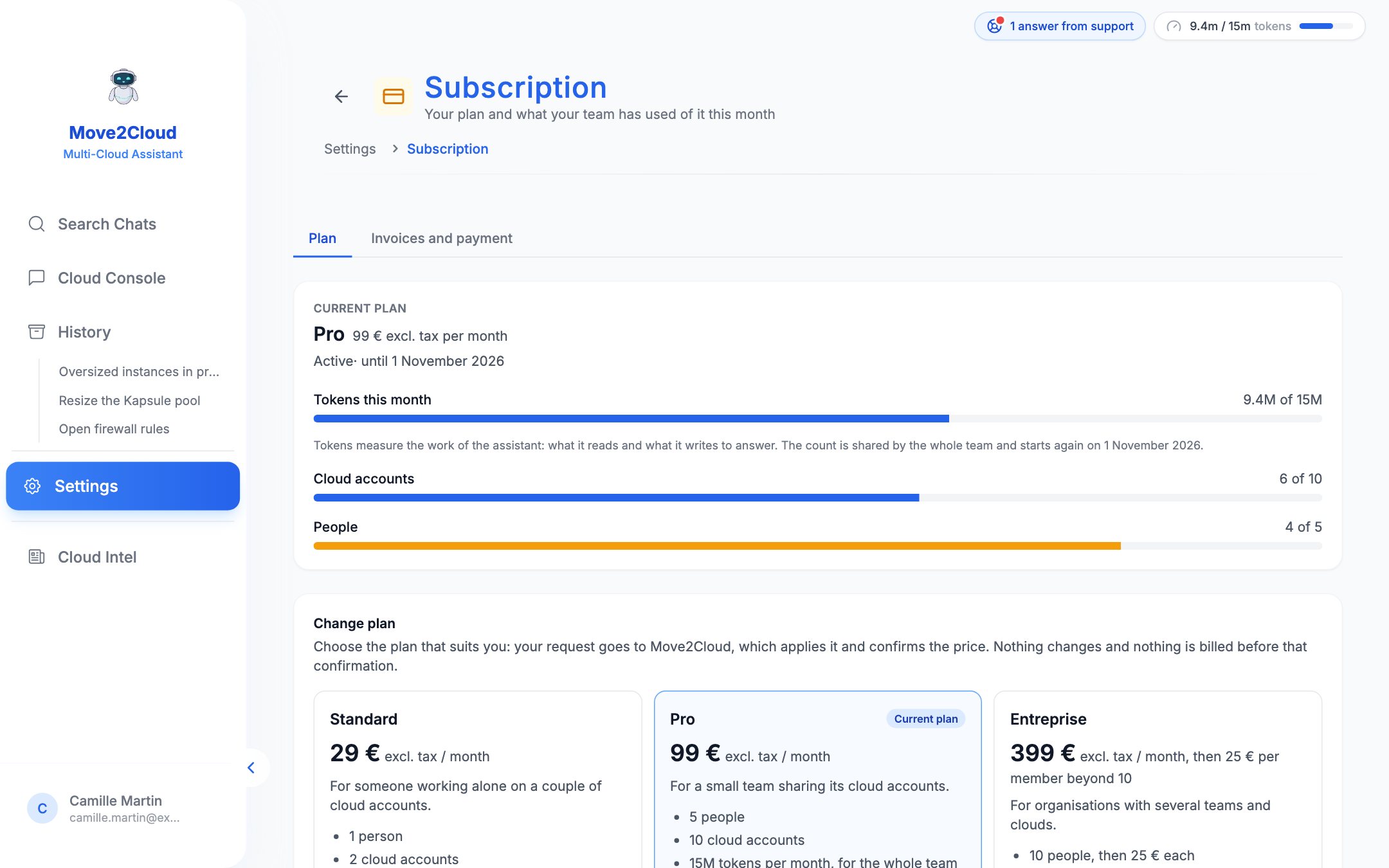
Settings → Subscription: the current plan, what the team has used of it, and the request for another plan.
Settings → Subscription: the current plan, what the team has used of it, and the request for another plan. (example data)

Tokens

Tokens measure the work of the assistant: what it reads and what it writes to answer. Each plan includes a number of them per calendar month, shared by the whole team. The meter at the top right and Settings → Subscription show what has been used; from 80 % the meter warns. Once the allowance is used up, questions are refused until the next month or until it is topped up: ask for a top-up with a support request of the Billing kind.

Trial

A trial lasts 14 days with 500k tokens, for 1 member and two cloud accounts. It is opened by Move2Cloud on request.

Changing plan

An administrator of the organisation asks for another plan from Settings → Subscription. The request goes to Move2Cloud, which applies it and confirms the price: nothing changes and nothing is billed before that confirmation. A request can be taken back while it waits.

Invoices and payment

Your invoices are listed in Settings → Subscription, with their document. The owner of the organisation can register a bank card, a SEPA direct debit or a PayPal account: invoices issued afterwards are then collected on their due date, after a notice by e-mail at least 3 days before. An invoice can also be paid one by one, online.

Who holds your means of payment

Payment is handled by Mollie, a European provider. Move2Cloud keeps neither card number nor IBAN: only what is needed to show it, such as “Visa •••• 4242”. Removing the means of payment stops the automatic collection.

Documentation — CloudOps Move2Cloud